Last updated: October 2026
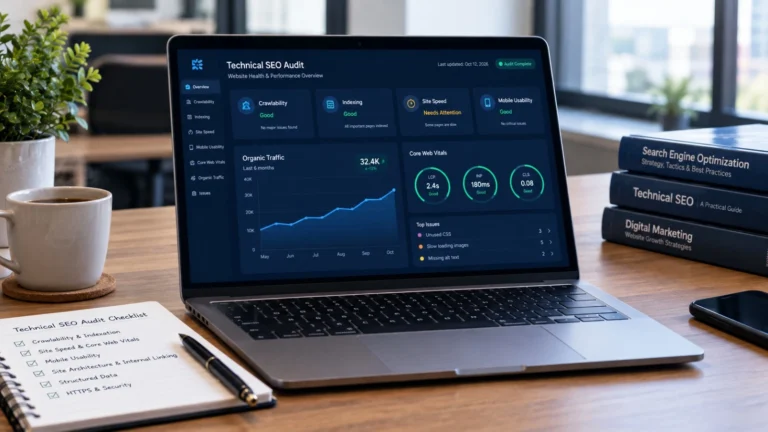
Technical SEO audit services check how well search engines can crawl, understand and load your website, then turn the problems they find into a prioritized fix list. Think of it as a health check for the part of your site that visitors never see.
If your traffic has stalled or new pages won’t get indexed, the cause is often technical, not the content. This guide covers what an audit checks, what you should get at the end, what it costs and how to pick a provider you can trust.
What Are Technical SEO Audit Services?
A technical SEO audit is a structured check of your site’s foundation, seen the way a search engine sees it. Can Google find your pages? Can it read them? Do they load fast enough that people stay? Those are the questions an audit answers.
Think of a home inspection. Nobody judges a house by its paint. You check the wiring, the plumbing and the foundation first. The same logic applies to a website.
Technical SEO services go one step further. Instead of stopping at a report, many providers also help your developer fix the issues and then re-check the results. When you compare offers, find out which of the two you’re actually buying.
Technical SEO Audit vs. a General SEO Audit
A general audit also reviews content, keywords and backlinks. A technical audit stays on the foundation: crawling, indexing, speed, structure and code. Plenty of SEO audit services bundle both, so read the scope before you pay. And if a website SEO audit comes at a very low price, check that it isn’t just a tool export with a logo on top.
What a Technical SEO Audit Covers
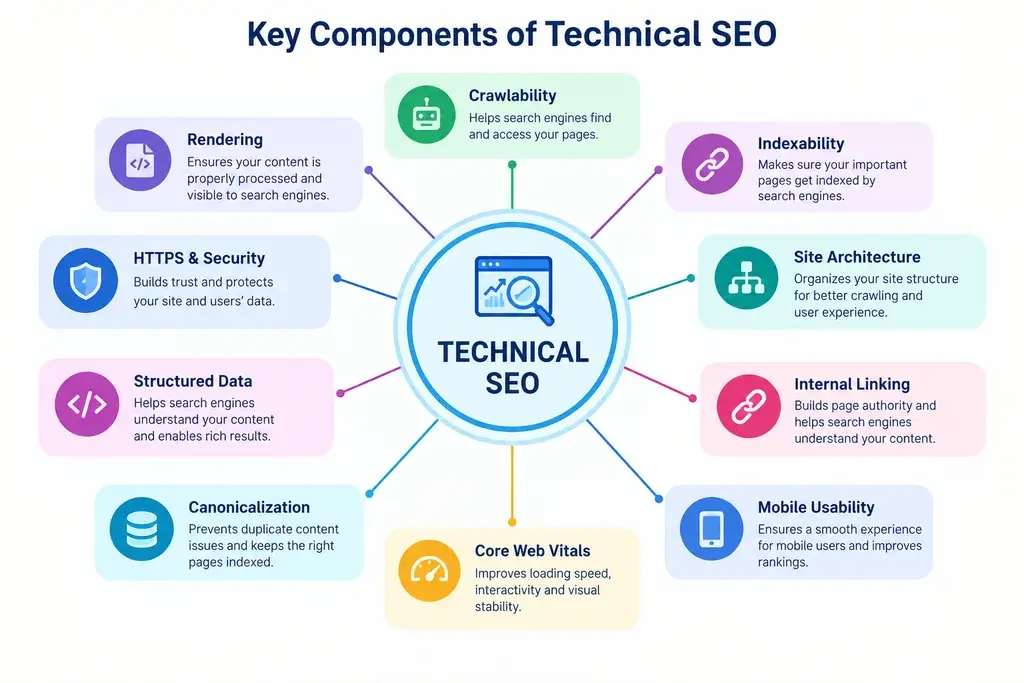
Every provider has its own list, but a solid audit works through the areas below. The order matters too. Crawling and indexing come first, because a problem there makes every later check less useful. If Google can’t reach a page, its load speed hardly matters.
Crawlability and Indexation
Search engines can’t rank pages they can’t reach. The audit checks your robots.txt file, XML sitemap, noindex tags and canonical tags. It also looks for pages that were blocked or left out of the index by mistake.
One trap shows up again and again. Someone blocks a page in robots.txt and adds a noindex tag, expecting the page to vanish. But if robots.txt blocks the page, Google can’t see the noindex tag at all. The two tools do different jobs: robots.txt controls crawling, and noindex controls indexing.
Sitemaps need care too. Keep only indexable, canonical URLs in them. Canonical tags are hints, not commands, so Google may choose a different URL than the one you picked. On very large sites, the audit also looks at crawl budget, meaning how much of the site Google chooses to crawl. For most small and mid-size sites, it isn’t the main worry.
Site Speed and Core Web Vitals
Core Web Vitals measure real user experience through three metrics: loading (LCP), responsiveness (INP) and visual stability (CLS). Google’s “good” marks are 2.5 seconds or less for LCP, 200 milliseconds or less for INP, and 0.1 or less for CLS, measured at the 75th percentile of real page visits.
So where should you look? At field data, such as the Core Web Vitals report in Google Search Console, not just a one-off lab test. Lab tests help developers debug. Field data shows what real visitors felt. A page can look fine in a lab run and still fail for people on slower phones.
Slow INP often traces back to third-party scripts like chat widgets, ad tags and trackers. A good audit names the exact script causing the delay. Keep expectations honest, though. Core Web Vitals are one signal among many, so speed fixes alone rarely rescue a site with deeper problems.
Mobile Usability
Google mostly uses the mobile version of a page for indexing. The audit checks viewport settings, text size and tap-target spacing. Most important, it checks whether the mobile page shows the same content and links as the desktop one. If it doesn’t, Google may never see what’s missing.
Site Architecture, URL Structure and Internal Linking
Pages buried deep in a site tend to be crawled less often. The audit reviews your hierarchy, URL patterns, broken links, redirect chains and orphan pages, which are pages that no other page links to. A page with no internal links is hard for crawlers and visitors alike to find.
Structured Data and Schema Markup
Schema markup helps search engines understand what a page is about. The audit validates your existing markup and spots pages where valid markup fits, such as Article, BreadcrumbList or Organization. But the markup must match what’s visible on the page. And it doesn’t guarantee a rich result, since Google decides which ones to show.
HTTPS and Security
Expired certificates, mixed content and messy redirects between HTTP and HTTPS erode trust and can break forms. The audit checks that every page loads over HTTPS and that every HTTP address redirects cleanly to its secure version.
JavaScript Rendering and AI Crawler Access
If your main content or links only appear after JavaScript runs, some crawlers may miss them. Google can render JavaScript, but it takes extra processing, and some AI crawlers don’t run it at all. So the audit compares the raw HTML with the rendered page. It also reviews your robots.txt rules, so you know exactly which bots you’re letting in or blocking, and why.
What You Get After a Technical SEO Audit
A folder of error screenshots isn’t an audit. The report should turn findings into a plan you can act on. Good technical SEO audit services deliver:
- Issues ranked by impact
- The affected URLs for each issue
- Plain-language fix steps a developer can follow
- A named owner for each fix, such as a developer, content team or hosting provider
- A quick-wins list you can finish in days
- A re-check after the fixes go live
Here’s what a single finding should look like. This is a made-up example, only to show the format:
| Field | Example |
| Issue | Product pages carry a noindex tag after a theme update |
| Impact | High: the pages can’t appear in search |
| Evidence | Page indexing report shows “Excluded by ‘noindex’ tag” |
| Fix | Remove the tag from the product template |
| Owner | Developer |
| Check | Re-crawl, then request indexing for key URLs |
Ranking issues by priority is what makes a report usable. A simple scale looks like this:
| Priority | What it means | Examples |
| Critical | Blocks indexing or breaks the site | Noindex on key pages, robots.txt blocking the whole site, staging site in the index |
| High | Hurts crawling or user experience at scale | Redirect chains on main paths, failing Core Web Vitals on key templates, duplicates with no canonical |
| Medium | Worth fixing, but not urgent | Missing schema, oversized images on low-traffic pages |
| Low | Housekeeping | Minor URL cleanup |
Benefits of Technical SEO Audit Services
The benefits of technical SEO show up in a few places:
- Important pages get found, because crawl and index blocks are removed.
- Pages load faster, so visitors are less likely to leave.
- Content and link building pay off better on a clean foundation.
- You get a priority list instead of a guess.
- Problems surface early, before they turn into a traffic drop.
What a Technical SEO Audit Can and Can’t Do
An audit finds problems. It doesn’t rank your site by itself. Fixing technical issues removes barriers, but rankings still depend on content quality, search intent, competition and authority.
So what’s realistic? Cleaner crawling, fewer errors, faster pages and a stronger base for everything else you do in SEO. Be wary of anyone promising exact rankings or traffic numbers. Nobody controls Google, and a provider who says otherwise is selling hope.
Signs Your Website Needs a Technical SEO Audit
Some signs are loud. Others sit quietly in Search Console for months. Watch for these:
- Traffic dropped and you can’t explain why
- New pages take a long time to appear in Google
- Search Console lists many pages as “Crawled – currently not indexed” or “Discovered – currently not indexed”
- The site feels slow, especially on mobile
- You recently redesigned, changed your CMS or moved to a new domain
- You’ve never had an audit
As a rule of thumb, run one every 6 to 12 months, and always before and after a redesign or migration.
Seeing “Crawled – currently not indexed” in Search Console? Our guide on How to Fix Crawled But Not Indexed in Google Search Console walks you through the fix.
How a Technical SEO Audit Works, Step by Step
- Scope the site. Confirm the size, CMS and goals, and get access to Search Console and analytics.
- Crawl the site. A crawler maps your URLs, status codes, links and metadata.
- Review Search Console and field data. Check the page indexing, Core Web Vitals and crawl stats reports, and use the URL Inspection tool on key pages.
- Test rendering and mobile. Compare raw HTML with the rendered page and check the mobile version.
- Prioritize the findings. Rank each issue by impact and effort.
- Deliver the report. A good provider walks you through it in plain language.
- Fix and re-check. Confirm that the fixes worked and nothing new broke.
Don’t expect results overnight. After changes go live, Google needs time to recrawl and reprocess your pages, which can take days or weeks depending on the site.
Technical SEO Checklist: Common Issues and Their Impact
Most technical problems look small on their own. Together, they can quietly keep good pages out of search. Use this technical SEO checklist as a quick screen. It won’t replace a full audit, but it shows you where trouble tends to hide.
- Stray noindex tag on key pages: Pages drop out of search. Check the page indexing report in Search Console.
- Key URLs blocked in robots.txt: Crawlers can’t reach them. Review your robots.txt file and test the page with the URL Inspection tool.
- Redirect chains and broken links: They waste crawling and frustrate visitors. Your crawler’s response-code and link reports will show them.
- Duplicate pages without clear canonicals: Signals get split and crawling gets wasted. Look at the crawler’s duplicate-content report.
- Orphan pages: They’re hard to discover and crawl. Compare your crawl results with your sitemap and analytics URLs.
- Slow LCP or INP: User experience suffers, and so do your Core Web Vitals. Check the Search Console report and PageSpeed Insights.
- Faceted navigation crawl traps: Filters can create thousands of near-duplicate URLs. A crawl that returns huge numbers of parameter URLs is the giveaway.
- JavaScript-only content or links: Content may go unseen. Compare the raw HTML with the rendered page.
- Hreflang errors: The wrong language or country version may show in results. Look for missing return tags in the crawler’s hreflang report.
- Staging site in the index: It creates duplicate content and puts wrong URLs in search results. Run a site: search and check Search Console.
- Mixed content: It triggers security warnings and can break page elements. The browser console and your crawler will flag it.
Found several of these at once? Start with the ones that block indexing, then work your way down the list.
WordPress and Shopify: Where Technical Issues Usually Hide
Platform sites have their own habits. On WordPress, plugins pile up, and each one can add scripts, styles and database queries. On Shopify, apps often inject code into every page, and collections, tags and filters can create duplicate URLs. So a platform audit is partly an add-on audit. Which ones are you still using, and what does each one cost you in speed?
If your site runs on WordPress, a clean build helps. Our WordPress development service focuses on fast, secure and responsive sites.
Technical SEO Tips to Fix Issues After the Audit
These technical SEO tips work best in this order, because earlier fixes can change what later checks show:
- Fix anything that blocks indexing first: stray noindex tags, robots.txt rules and wrong canonicals.
- Clean up redirect chains and broken internal links.
- Fix slow templates, not single pages. One template fix can speed up hundreds of URLs.
- Remove or delay third-party scripts you don’t need.
- Submit a clean sitemap in Search Console and watch the indexing report.
- Re-crawl the site and compare it with the original audit.
The usual mistakes? Fixing low-impact warnings first, changing too many things at once so you can’t tell what worked, and skipping the re-check.
What Affects the Cost of Technical SEO Audit Services?
No single price fits every site, because scope drives the cost. A very low price can mean a shallow, tool-generated report. These factors move the price:
- Site size and number of page templates
- Platform and tech stack, since custom JavaScript builds take longer to test
- International or multilingual setup
- How much manual review goes into the work
- Whether implementation help is included
- One-time audit or ongoing monitoring
Providers also scope audits differently, some by page count and some by hours. A 20-page site and a 20,000-page store will never cost the same. Ask for the scope in writing, and ask what’s left out.
Want to see how SEO pricing works in the US, step by step? Read our guide, SEO Cost for Small Business 2026: Real Pricing Guide (USA).
Can You Do a Technical SEO Audit Yourself?
Sometimes, yes. On a small site, free tools get you surprisingly far. Google Search Console shows indexing problems and Core Web Vitals. PageSpeed Insights tests speed. The URL Inspection tool shows how Google sees one page. And a desktop crawler such as Screaming Frog can crawl up to 500 URLs on its free version.
But bring in a specialist if your site has thousands of pages, runs an online store, serves several languages or leans heavily on JavaScript. The same goes for a traffic drop you can’t explain. Finding issues is the easy part. Deciding which ones matter is where experience pays off. Easy Client Hub offers a free SEO audit if you’d like a starting point before you decide.
How to Choose Technical SEO Audit Services You Can Trust
Ask these questions before you hire anyone:
- What does the final report look like? Ask for a redacted sample.
- Is the work a manual review, or a tool export?
- Do they judge speed on field data, not only lab scores?
- Will someone walk you through the findings?
- Is a re-check or implementation support included?
- Can they explain each problem in plain language?
Red flags include guaranteed rankings, a fixed price quoted without looking at your site, and reports with no URLs or priorities. Easy Client Hub lists technical SEO among its SEO services, alongside on-page, off-page and local SEO.
Conclusion
Technical SEO audit services won’t replace good content, but they clear the path so your content can be found, crawled and loaded fast. Start with whatever blocks indexing, fix the slowest templates next, and always re-check.
Want to see where your site stands? Get a free SEO audit from Easy Client Hub, or contact us to talk through your site.
FAQs
Will fixing technical issues bring back lost traffic?
Not always. If the drop came from a technical fault, like an accidental noindex tag, fixing it can restore visibility. But if it came from a core update or weaker content, technical fixes alone won’t bring traffic back.
How long until I see results after the fixes?
Google has to recrawl and reprocess your pages first, which can take days or weeks. Core Web Vitals field data is collected over a rolling period of about 28 days, so speed gains take a few weeks to show fully.
Does a new website need an audit before launch?
Yes, and it’s cheaper than fixing problems later. A pre-launch check catches leftovers from staging, such as a site-wide noindex tag, along with missing redirects and sitemap errors.
Can I audit just one section of my site?
You can. A scoped audit of one template, product category or blog section works well on large sites. Just remember that site-wide settings, like robots.txt, can still affect that section.
What access does a provider need?
Usually read-only access to Search Console and analytics, plus a crawl of the public site. Give people the lowest access level that gets the job done, and avoid sharing admin passwords.
What if the audit finds hundreds of issues?
Don’t panic. Most reports list many low-priority items. Fix critical and high-priority problems first, and group the rest by page template so one change clears many URLs at once.