Introduction
SEO doesn’t have to mean spending $200/month on tools before you’ve even ranked your first page. Most of what a small business actually needs keyword ideas, technical fixes, backlink checks, content readability is available for free, straight from Google or from generous freemium platforms.
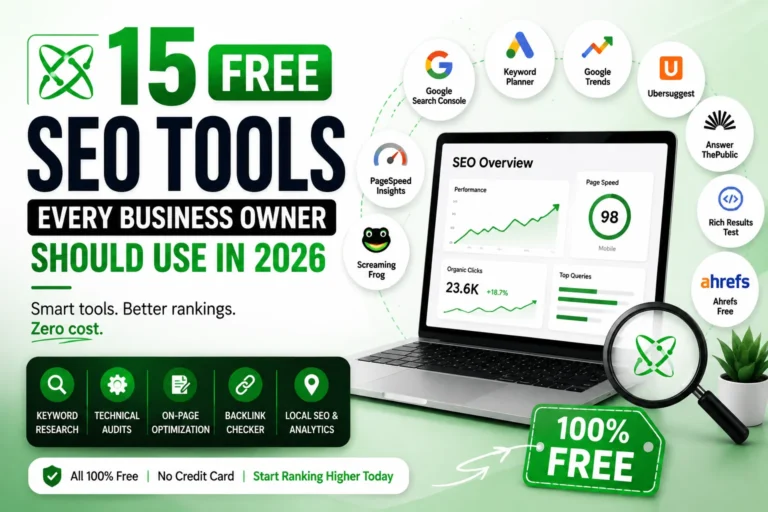
Below are 15 free SEO tools worth using in 2026, organized by what they actually help you do, so you’re not guessing which one solves which problem. Each one includes a quick summary and a real-world pro-tip from actually using these tools on client sites.
🚀 Start Here: Google Search Console
Before picking any other tool on this list, set up Google Search Console first. It’s completely free, takes five minutes to connect, and gives you the baseline every other tool builds on what Google already knows about your site, which pages are indexed, which queries you’re ranking for, and where things are breaking.
Everything else on this list adds detail on top of that baseline. Search Console tells you where you stand; the rest help you improve from there. Setting this up properly is also step one of a full SEO audit full technical details on Search Console itself are below (#5).
Keyword Research Tools
1. Google Keyword Planner
Quick Summary: Best for finding raw search volume and keyword ideas directly from Google.
Free inside Google Ads you don’t need to run active campaigns to use it for research. One thing to know upfront: accounts without active ad spend only show broad volume ranges (e.g., 1K–10K searches/month) instead of exact numbers. If you need more precision, pair it with a broader keyword research process or a paid keyword tool but for spotting keyword opportunities and gauging relative demand, the free ranges are enough to work with.
💡 Pro-Tip: Set your campaign type to “Website traffic” (not “Sales”) when creating the dummy campaign required to access Planner it keeps Google from nudging you toward launching real paid ads while you’re just there for research.
2. Google Trends
Quick Summary: Best for spotting rising or seasonal search interest before you commit to a topic.
Shows how interest in a keyword rises or falls over time, plus related and rising queries. Useful for catching seasonal trends and validating whether a topic is growing or dying before you write a full blog post around it.
💡 Pro-Tip: Always set the comparison window to “past 5 years” instead of the default 12 months a lot of keywords that look “trending” are actually just repeating the same seasonal spike every year.
3. Ubersuggest (Free Tier)
Quick Summary: Best for quick keyword validation when you’re just starting out.
Gives keyword suggestions, estimated volume, and SEO difficulty scores without a paid account, though daily searches are limited. Good starting point for beginners who need quick keyword validation.
💡 Pro-Tip: Do your Ubersuggest searches early in the day the free daily limit resets at midnight, and it’s easy to burn through it testing random keyword ideas.
4. AnswerThePublic (Free Tier)
Quick Summary: Best for turning one keyword into a full list of real questions people ask.
Generates question-based keyword ideas (who, what, why, how) around a seed keyword perfect for building FAQ sections and blog outlines that match real search intent.
💡 Pro-Tip: Feed the “why” and “how” questions it generates straight into your FAQ schema these match almost exactly how people phrase voice searches and AI Overview prompts.
Technical SEO Tools
5. Google Search Console
Quick Summary: Best for tracking indexing, rankings, and site health straight from Google.
The single most important free tool in this list. Shows indexing status, search queries you’re already ranking for, crawl errors, mobile usability issues, and Core Web Vitals data all straight from Google. If you ever see pages stuck as “crawled but not indexed,” check our step-by-step fix guide.
💡 Pro-Tip: Check the “Pages” report weekly, not monthly catching a sudden drop in indexed pages within a week means you can fix it before it costs you real ranking losses.
6. Google PageSpeed Insights
Quick Summary: Best for diagnosing exactly what’s slowing your site down.
Tests your site’s loading speed and Core Web Vitals (LCP, CLS, INP) on both mobile and desktop, then tells you exactly what’s slowing you down.
💡 Pro-Tip: Always test the mobile score, not desktop most real visitors and Google’s own ranking crawler prioritize the mobile experience, and mobile scores are almost always worse.
7. Screaming Frog SEO Spider (Free Version)
Quick Summary: Best for a full technical crawl of small-to-mid-sized sites.
Crawls up to 500 URLs for free, surfacing broken links, duplicate title tags, missing meta descriptions, and redirect chains a proper technical audit without paying for the full license.
💡 Pro-Tip: Exclude images, JS, and CSS files from the crawl settings before you start otherwise those files eat into your 500-URL limit fast, and you’ll run out before you’ve even crawled all your actual pages.
8. Google Rich Results Test
Quick Summary: Best for confirming your schema markup will actually show rich snippets.
Checks whether your schema markup (BlogPosting, FAQPage, Product, etc.) is valid and eligible for rich snippets in search results. New to schema? Our complete schema markup guide covers exactly what to add and where.
💡 Pro-Tip: Test the live URL, not just your code snippet sometimes a caching plugin or theme conflict strips out schema after publishing, and you’d never catch that testing the code alone.
On-Page & Content Tools
9. Yoast SEO / Rank Math (Free Versions)
Quick Summary: Best for real-time on-page guidance while writing in WordPress.
WordPress plugins that guide on-page optimization in real time title tags, meta descriptions, readability, and internal linking suggestions as you write. For a deeper dive on getting the most out of these, see our WordPress SEO tips guide.
💡 Pro-Tip: Ignore the green/red traffic light score once your title and meta are solid chasing a perfect score often leads to keyword-stuffed, unnatural-sounding sentences that hurt readability more than they help rankings.
10. Grammarly (Free Version)
Quick Summary: Best for catching clarity issues that quietly hurt time-on-page.
Catches grammar and clarity issues that hurt readability and readability affects how long users stay on your page, which indirectly affects rankings.
💡 Pro-Tip: Set the goal to “Informal” for blog content, not “Formal” Grammarly’s formal setting pushes overly stiff, corporate-sounding sentences that read worse for SEO content meant to sound human.
11. Hemingway Editor
Quick Summary: Best for simplifying sentences so both users and AI Overviews can scan them fast.
Free web-based tool that flags overly complex sentences and passive voice, helping you write content that’s easier to scan important for both users and AI Overviews pulling snippets from your page.
💡 Pro-Tip: Aim to clear every red (very hard to read) highlight, but don’t stress about every yellow one some longer sentences are fine as long as the overall grade level stays around 8-9.
Backlink & Off-Page Tools
12. Ahrefs Free Backlink Checker
Quick Summary: Best for a quick spot-check of your own or a competitor’s backlink profile.
Shows your top backlinks and referring domains without needing a paid Ahrefs account limited data, but enough to spot-check your link profile or a competitor’s. Want to build more links without paying? Check our free high-quality backlink sites guide.
💡 Pro-Tip: Run your top 3 competitors through it once a month new backlinks they pick up often point to link-worthy content ideas you haven’t covered yet.
13. Moz Link Explorer (Free Tier)
Quick Summary: Best for a second opinion on backlink data using Moz’s own Domain Authority metric.
Gives limited free monthly queries showing referring domains, anchor text distribution, and Moz’s Domain Authority score useful as a cross-check against Ahrefs’ free checker since no single tool captures 100% of the backlink web.
💡 Pro-Tip: Use it specifically to check anchor text distribution if too many of your backlinks use the exact same anchor text, that’s a spam signal Google can penalize, and Moz surfaces this clearly.
Local SEO Tools
14. Google Business Profile
Quick Summary: Best for controlling how your business appears in Google Maps and local search.
Free and essential if you serve local clients controls how your business shows up in Google Maps and local search results, and directly affects local rankings. See our full Google Business Profile optimization checklist to set it up correctly.
💡 Pro-Tip: Post an update (offer, photo, or news) at least once a week profiles with regular activity consistently show up more often in the local “map pack” than dormant ones.
Analytics & Tracking
15. Google Analytics 4
Quick Summary: Best for understanding where your traffic comes from and what it does on-site.
Tracks where your traffic comes from, which pages convert, and how users behave on your site connect it with Search Console for a complete picture of what’s working.
💡 Pro-Tip: Set up at least one conversion event (form submit, call click, or purchase) in your first week traffic numbers alone don’t tell you whether SEO is actually bringing in business.
Quick Comparison — How to Choose the Right Tool
| Tool | Best For | Choose It If… | Limitation |
|---|---|---|---|
| Google Search Console | Indexing & performance | You’re setting up SEO for the first time start here | No keyword volume data |
| Google Keyword Planner | Search volume | You need broad demand estimates before writing content | Needs Google Ads account; ranges only without ad spend |
| Screaming Frog | Technical audits | Your site has 500 pages or fewer and you suspect broken links/duplicate tags | 500 URL limit (free) |
| Ubersuggest | Beginner keyword research | You want quick keyword ideas without a learning curve | Daily search limits |
| Ahrefs Backlink Checker | Quick backlink checks | You want to spot-check your own or a competitor’s links occasionally | Limited data on free tier |
| Yoast/Rank Math | On-page optimization | You run WordPress and want live guidance while writing | WordPress only |
Are Free SEO Tools Enough for a Small Business?
For most small businesses starting out, yes the tools above cover keyword research, technical health, on-page optimization, and backlink tracking without spending a rupee. You’ll likely need a paid tool (like Ahrefs or Semrush) only once you’re managing multiple sites or need deeper competitor analysis.
Conclusion
You don’t need a big budget to run solid SEO you need the right free tools used consistently. Start with Google Search Console and Keyword Planner, layer in a technical crawler like Screaming Frog, and build from there as your site grows.
If managing all of this feels like too much on top of running your business, EasyClientHub offers a free SEO audit to show you exactly where you stand and what to fix first or read our breakdown of DIY SEO vs hiring an agency to decide which route fits you right now.
FAQs
Are free SEO tools enough for small business?
Yes, for most small businesses, free tools cover the core needs keyword research, technical audits, and basic backlink tracking. Paid tools become more useful once you’re scaling or managing several sites.
What’s the best free alternative to Ahrefs?
Google Search Console combined with Ubersuggest and Ahrefs’ own free backlink checker covers most of what small businesses need without a paid subscription.
Can I do SEO completely without paying for tools?
Yes, especially in the early stages. Google’s own free tools (Search Console, Keyword Planner, PageSpeed Insights, Analytics) cover the fundamentals well.
What free tools does Google offer for SEO?
Google offers Search Console, Keyword Planner, Trends, PageSpeed Insights, Rich Results Test, Analytics 4, and Google Business Profile all free.
Which free SEO tool should I set up first?
Google Search Console. It’s the foundation everything else builds on without it, you’re optimizing blind since you won’t know which pages are indexed or which queries you’re already ranking for.
Do free SEO tools give accurate keyword search volume?
Mostly, but with caveats. Google Search Console shows your actual click and impression data (100% accurate for your site), while Google Keyword Planner shows only broad volume ranges unless you’re running active ad spend. For precise numbers, you’d need a paid tool like Ahrefs or Semrush.