If two websites have identical content, identical keywords, and identical backlinks but one has schema markup and one doesn’t which one do you think shows up with star ratings, richer search listings, and a spot in Google’s AI Overview?
That’s not a hypothetical. It’s the exact situation search engines face every day, and schema markup is usually the deciding factor.
Most website owners have never touched their schema markup, or don’t even know it exists. That’s a real gap, because in 2026, structured data isn’t a “nice to have” technical extra anymore it’s how search engines and AI tools actually understand what your content means.
This guide breaks down what schema markup is, why it matters for SEO in 2026, and exactly how to add it to your website step by step.
Table of Contents
- What Is Schema Markup?
- Why Schema Markup Matters for SEO in 2026
- Schema Markup vs. Structured Data: What’s the Difference?
- Types of Schema Markup (With Examples)
- Does Schema Markup Improve Google Rankings?
- How to Add Schema Markup to Your Website
- Schema Markup and AI Search (AI Overviews, ChatGPT, Copilot)
- How to Validate and Test Your Schema Markup
- Common Schema Markup Mistakes to Avoid
- Frequently Asked Questions
- Final Thoughts
What Is Schema Markup?
Schema markup is a standardized code usually written in JSON-LD format that you add to your website to help search engines understand exactly what your content represents, not just what it says.
Think of it this way: humans read your webpage and understand context naturally. A photo of a five-star rating, a price, and a product name obviously means “this is a product for sale.” Search engines can’t infer that as easily. Schema markup spells it out in a language machines understand, using a shared vocabulary maintained at Schema.org.
This clarity is what powers rich results the star ratings, FAQ dropdowns, recipe cards, and event details you see directly inside Google’s search results.
Pro Tip: You don’t need to write schema markup by hand. If your site runs on WordPress, plugins like Yoast SEO, RankMath, or Schema Pro can generate most of it automatically you’ll just need to fill in a few fields.
Why Schema Markup Matters for SEO in 2026
Search engines and AI tools now process content very differently than they did even two years ago. A few numbers make the shift clear:
| Metric | Data Point |
|---|---|
| First-page pages using schema | 72% of pages on Google’s first page use some form of schema markup (Backlinko) |
| Sites using JSON-LD | Roughly 41% of all pages now use JSON-LD, up from 34% two years earlier (HTTP Archive Web Almanac) |
| AI Overview citation boost | Pages with well-implemented structured data are cited over 2x more often in AI Overviews than unmarked pages |
| CTR improvement | Rich results from schema markup can boost click-through rates by 30–50% compared to plain blue links |
Google has been direct about one important nuance here: structured data is not a direct ranking factor. Adding schema markup to a thin, low-quality page won’t push it to position one. But it is one of the strongest levers available for winning rich results, AI Overview citations, and Knowledge Graph recognition all of which drive real clicks and visibility even without moving your core ranking position.
If you’re already investing in Local SEO and Google Business Profile optimization, schema markup is the technical layer that ties everything together and helps Google connect the dots between your website, your listing, and your brand.
Pro Tip: The 30–50% CTR boost from rich results is often the fastest, most measurable win from schema markup. Even without a ranking change, a star rating or clean breadcrumb next to your listing makes it visually stand out against plain blue links and more clicks at the same ranking position means more traffic without waiting months for algorithmic movement.
Schema Markup vs. Structured Data: What’s the Difference?
These terms get used interchangeably, and understanding the difference clears up a lot of confusion:
- Structured data is the general concept any data organized in a predictable format that machines can read.
- Schema markup is the specific vocabulary (from Schema.org) used to write that structured data for search engines.
- JSON-LD is the current recommended format for writing schema markup a block of code that sits in your page without affecting the visible design.
In short: structured data is the category, schema markup is the language, and JSON-LD is how you write it on your page today.
Types of Schema Markup (With Examples)
Not every business needs every schema type. Here are the ones that consistently deliver results in 2026:
| Schema Type | Best For | What It Enables |
|---|---|---|
| Organization | Every website, homepage | Confirms your brand as a real, named entity; feeds the Knowledge Graph |
| Article / BlogPosting | Every blog post | Ties content to an author and publish date; supports E-E-A-T signals |
| LocalBusiness | Businesses with a physical location or service area | Powers the local map pack and “near me” search results |
| FAQPage | Pages with genuine Q&A content | FAQ dropdowns directly in search results |
| Product | E-commerce product pages | Star ratings, pricing, and availability badges |
| HowTo | Step-by-step guides and tutorials | Expandable instructions inside search results |
| BreadcrumbList | Any multi-level site structure | Cleaner, more clickable URL breadcrumbs in search results |
Pro Tip: Start with four schema types Organization, Article, LocalBusiness (if applicable), and FAQPage. Only add more once those pages genuinely contain that type of content. Adding schema for content that isn’t really there is a guideline violation and can backfire.
Does Schema Markup Improve Google Rankings?
This is the most common question business owners ask, and the honest answer is nuanced.
What schema markup does NOT do:
- It does not directly boost your position in the organic rankings
- It cannot compensate for thin, low-quality, or duplicate content
- It does not guarantee a citation in AI Overviews or ChatGPT answers
What schema markup DOES do:
- Increases your chances of earning rich results (stars, FAQs, breadcrumbs)
- Improves click-through rate, which is itself an indirect ranking signal
- Makes your content dramatically easier for AI systems to parse and extract accurately
- Strengthens entity recognition, helping Google understand who you are across your entire web presence
A study from Ahrefs tracking structured data on roughly 1,900 pages found that schema alone doesn’t guarantee AI citations, but sites with clean, consistent markup were disproportionately represented among pages that did get cited. The takeaway: schema markup is not a shortcut, but it removes doubt and removing doubt is exactly what search engines and AI systems reward.
Pro Tip: Treat schema markup as insurance for your best content, not a fix for your weakest pages. Prioritize adding it to your highest-value posts and service pages first.
How to Add Schema Markup to Your Website
You don’t need to be a developer to implement schema markup correctly. Here’s the practical path:
- Identify your page type — is it a blog post, product page, FAQ page, or local business page?
- Choose the matching schema type from the table above
- Generate the JSON-LD code — either through a WordPress plugin (Yoast, RankMath, Schema Pro) or a free schema generator tool
- Fill in accurate fields — name, author, dates, images, and any other required properties. Never fill in placeholder or fake data
- Add the code to your page — most plugins insert it automatically into the page’s
<head>section - Validate it using Google’s Rich Results Test before publishing (covered in section 8)
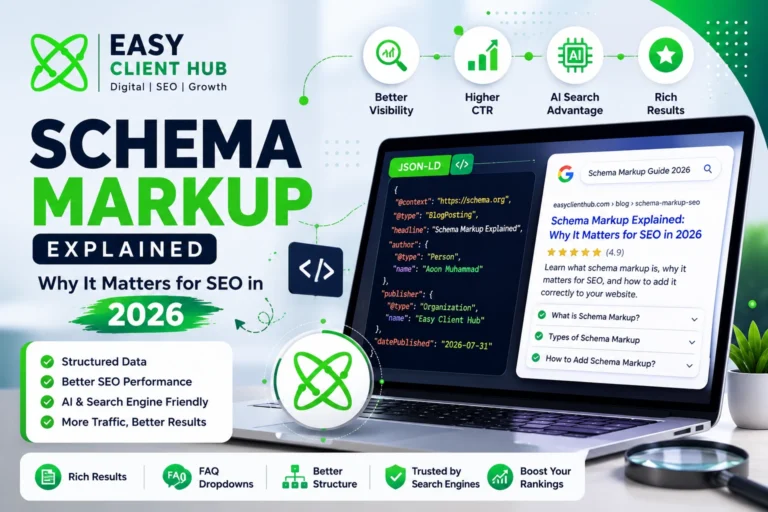
Example: Basic Article Schema
{
  "@context": "https://schema.org",
  "@type": "BlogPosting",
  "headline": "Your Post Title",
  "author": {
    "@type": "Person",
    "name": "Author Name"
  },
  "datePublished": "2026-07-31",
  "publisher": {
    "@type": "Organization",
    "name": "Your Business Name"
  }
}
Pro Tip: If you’re adding FAQPage schema, make sure the questions and answers in your code exactly match the visible content on your page. Mismatched schema is one of the fastest ways to lose rich result eligibility and it’s worth setting expectations correctly here (more on this in the mistakes section below).
Schema Markup and AI Search (AI Overviews, ChatGPT, Copilot)
Schema markup’s role has expanded well beyond traditional Google rankings. In 2026, it plays a direct role in how AI-powered search tools discover and summarize your content.
- Google AI Overviews pull from clearly structured, entity-rich content more readily than unmarked pages
- Microsoft’s Bing team has confirmed that schema markup helps its models understand content for Copilot
- ChatGPT and Perplexity rely on clean, well-labeled content when citing external sources in their answers
This connects directly to what’s known as Generative Engine Optimization (GEO) or Answer Engine Optimization (AEO) the practice of structuring content so AI systems can extract and cite it accurately, not just so it ranks in traditional search. If you’re building out an AI SEO strategy, schema markup is one of the most concrete, actionable steps you can take today.
Pro Tip: Use
sameAsproperties in your Organization schema to link to your verified social profiles and business directories. This helps AI systems confirm your brand is a real, consistent entity across the web reinforcing the same NAP consistency principles that matter for local SEO.
How to Validate and Test Your Schema Markup
Never publish schema markup without testing it first. A single syntax error can make the entire block invalid.
- Copy your JSON-LD code
- Go to Google’s Rich Results Test
- Paste your code or enter your live URL
- Check for errors or warnings and fix any flagged fields
- Re-test after every update to your schema
Pro Tip: Bookmark the Rich Results Test and re-check your top pages every few months. Google periodically updates its structured data requirements, and markup that validated perfectly last year can quietly start throwing warnings.
Common Schema Markup Mistakes to Avoid
- Marking up content that doesn’t exist on the page a direct violation of Google’s structured data guidelines
- Letting FAQ schema fall out of sync with the actual visible FAQ content after edits
- Using outdated schema types that Schema.org has deprecated
- Adding every schema type to every page instead of matching schema to actual content
- Forgetting to update
dateModifiedwhen a post is significantly revised - Skipping validation before publishing, resulting in silent errors that block rich results entirely
- Expecting FAQ dropdowns to appear for a standard commercial site see the important note below
Important 2026 Update on FAQ Schema: Since a late-2023 algorithmic change, Google has significantly scaled back which sites are eligible for the FAQ accordion dropdown in search results. Today, that visual rich result is largely reserved for authoritative government and health websites, not standard commercial blogs, agencies, or small business sites. This doesn’t mean FAQ schema is pointless it still helps AI tools and LLMs like ChatGPT and Google AI Overviews parse your Q&A structure and understand your content more precisely. Just don’t build your content strategy around the expectation that Google will display a visible FAQ dropdown in your SERP listing; treat FAQ schema as a machine-readability tool first, and a rich-result opportunity second.
Always validate every schema block before and after publishing using Google’s Rich Results Test it takes under a minute and catches issues before they cost you visibility.
Conclusion
Schema markup won’t rescue weak content, and it won’t single-handedly push you to position one. What it does is remove doubt telling search engines and AI systems exactly who you are, what your content means, and why it’s worth showing to the right person at the right moment.
Here’s the part most businesses miss: your competitors are reading the same generic “add schema markup” advice you’ve seen everywhere else, and most of them will never actually implement it correctly, validate it, or keep it in sync as their content changes. That gap between knowing and doing is exactly where real ranking and visibility advantages get won in 2026.
With over 70% of first-page results already using some form of schema, and AI-powered search tools leaning harder on structured, entity-rich content every month, the businesses that treat this as a one-time checkbox will keep losing visibility to the ones who treat it as ongoing technical hygiene. Right now, in the middle of 2026, is still early enough to get ahead of that curve but that window won’t stay open indefinitely as adoption keeps climbing.
Not sure if your website’s schema markup is set up correctly or set up at all?
At Easy Client Hub, we don’t just tell you what’s missing we implement it, validate it, and monitor it as part of a complete technical SEO strategy. Our clients get properly structured Organization, Article, LocalBusiness, and FAQ schema built to current 2026 standards, paired with our SEO Services, WordPress Development, and Digital Marketing offerings.
👉 Claim your free SEO audit today and get a clear, prioritized report of exactly what’s missing from your site’s structured data no obligation, no jargon, just a straightforward action plan you can actually use.
Prefer to see it in action first? Run any of your live pages through Google’s Rich Results Test right now and see exactly what Google can and can’t read from your site today.
Frequently Asked Questions
What is schema markup and why does it matter?
Schema markup is a standardized code that helps search engines understand what your content represents. It matters because it enables rich results, improves click-through rates, and helps AI search tools understand and cite your content accurately.
Does schema markup directly improve SEO rankings?
Not directly. Google has confirmed structured data is not a standalone ranking factor, but it significantly improves click-through rates and visibility through rich results, which can indirectly support rankings over time.
Is schema markup necessary for AI search visibility?
It’s not mandatory, but pages with clean, consistent schema markup are cited noticeably more often in AI Overviews and AI-powered assistants, since it removes ambiguity about what your content actually means.
How do I add schema markup to my WordPress website?
Plugins like Yoast SEO, RankMath, and Schema Pro can generate and insert most schema types automatically. For custom schema, you can manually add JSON-LD code through a Custom HTML block or your theme’s header.
What is the difference between schema markup and structured data?
Structured data is the broader concept of organizing information in a machine-readable format. Schema markup refers specifically to the vocabulary defined at Schema.org used to write that structured data.
Which schema type should I add first?
Start with Organization schema on your homepage and Article or BlogPosting schema on your blog posts. These form the foundation that most other schema types build on.
Can schema markup hurt my SEO if done incorrectly?
Yes. Marking up content that doesn’t exist on the page, using mismatched FAQ schema, or leaving validation errors unresolved can result in lost rich result eligibility or, in more serious cases, manual actions from Google.
How often should I update my schema markup?
Review it whenever you significantly update a page’s content, and re-validate your top-performing pages every few months, since Schema.org guidelines and Google’s requirements do change over time.
Do I need schema markup on every single page of my website?
No. Focus on your highest-value pages first homepage, service pages, and blog posts rather than adding schema everywhere. Quality and accuracy matter more than coverage.
Will FAQ schema make my FAQ dropdown appear in Google search results?
Usually not anymore. Since a late-2023 algorithmic change, Google largely limits the visible FAQ accordion rich result to authoritative government and health sites. For most commercial and small business sites, FAQ schema is still valuable, but mainly for helping AI tools and LLMs parse your content accurately, rather than for winning a visible dropdown in the SERP.
What’s the easiest way to check if my schema markup is working?
Run your page through Google’s Rich Results Test. It instantly flags syntax errors, missing required fields, and confirms which rich results your page is eligible for.
Does schema markup replace the need for good content?
No. Schema markup organizes and clarifies content that already exists it can’t compensate for thin, generic, or low-quality pages. Strong content plus clean schema markup is what actually moves the needle.
About the Author
Aoon Muhammad is a digital marketing specialist and SEO strategist at Easy Client Hub, helping small businesses and agencies grow their online presence. With hands-on expertise in technical SEO, structured data, and local search strategy, he has helped dozens of businesses rank higher on Google and get cited more often in AI-powered search results. Learn more about Easy Client Hub →