Published by Easy Client Hub | Author: Aoon Muhammad, SEO Specialist & Digital Marketing Expert | Reading time: 9 minutes
If two blog posts have identical word count, identical keywords, and identical backlinks but one is buried three clicks deep with zero internal links pointing to it, and the other sits one click from the homepage with ten contextual links which one do you think Google ranks first?
That’s internal linking in a nutshell. It’s the most underused SEO lever most small business websites have, and it costs nothing to fix.
In this guide, you’ll learn exactly how to build an internal linking strategy that improves your website’s crawlability, distributes link equity across your site, and keeps visitors reading longer without hiring an expensive SEO agency or buying a single tool. We’ll also cover website architecture, crawl depth, and how to build topical authority through smart content clusters.
Key Takeaways
- Internal links are 100% in your control unlike backlinks, you decide exactly which pages get linked and with what anchor text.
- Aim for 5–8 contextual links per standard blog post, 10–20 for pillar pages, and 3–5 for service pages.
- Orphan pages (pages with zero internal links) are nearly invisible to Google audit for them regularly.
- Descriptive anchor text helps both users and AI search systems understand what a page is about.
- A tight topic cluster (pillar page + supporting articles) builds topical authority faster than isolated posts.
In This Guide
- What Is Internal Linking?
- Why Internal Linking Matters in 2026
- Types of Internal Links
- Internal Linking Best Practices
- How Many Internal Links Per Page?
- Common Mistakes
- How to Audit Your Links
- Checklist
- FAQs
What Is Internal Linking?
Internal linking means connecting one page of your website to another page on the same website using a hyperlink. Unlike backlinks (links from other websites), internal links are 100% in your control you decide which pages get linked, how often, and with what anchor text.
Every time you link one blog post to another, or link a blog post to a service page like WordPress development, you’re doing internal linking.
Why Internal Linking Matters in 2026
Search hasn’t stayed the same. With Google’s AI Overviews and AI-driven search results becoming the default experience, internal linking now does double duty:
- Improves crawlability and crawl depth — search bots follow links to discover new pages. If a page has zero internal links, it sits deep in your crawl depth and can go unindexed for weeks. (We covered this exact problem in Why Isn’t Google Indexing My Website?)
- Distributes link equity — your homepage and top-performing posts usually hold the most authority. Internal link optimization lets you pass some of that power to newer or weaker pages in your site hierarchy.
- Builds topical authority through semantic linking — Google’s AI Overviews and LLMs read the relationships between your pages to understand what your site is actually an authority on. A tightly linked content cluster, built around pillar content, tells AI systems you’re credible on that topic.
- Keeps users engaged longer — session duration and pages-per-visit are strong indirect ranking signals. Good internal links guide readers deeper into your site instead of losing them after one page.
Types of Internal Links You Should Be Using
A strong site doesn’t rely on just one type of internal link. Use a mix of these four:
- Navigational links — your main menu, header, and footer. These carry the most weight because they appear on every page.
- Contextual links — links placed naturally inside your blog content (e.g., linking the phrase “schema markup” to your Schema Markup guide). These are the most valuable for SEO because they come with descriptive anchor text.
- Breadcrumb links — the small trail (Home > Blog > SEO) shown above your page title. They improve navigation and also appear in Google search results as rich snippets.
- Related/recommended content links — usually shown at the end of a post (“You might also like…”). These increase time-on-site and reduce bounce rate.
Internal Linking Best Practices for 2026
1. Use Descriptive, Natural Anchor Text
Avoid generic anchors like “click here” or “read more.” Instead, use anchor text that describes the destination page. For example, instead of “click here to learn about backlinks,” write: “learn how to get high-quality backlinks for free.”
Avoid: Repeating the exact same anchor text on every link to a page Google can flag this as over-optimization.
2. Follow the 3-Click Rule
Every important page on your site should be reachable within 3 clicks from your homepage. If a page is buried 5+ clicks deep, both users and Google’s crawler are less likely to find it.
3. Build Topic Clusters (Silo Structure)
Group related content together. For example, all your local SEO content — What Is Local SEO? and Google Business Profile Optimization — should link to each other and back to a central pillar page. This tells Google you have deep topical authority in that subject.
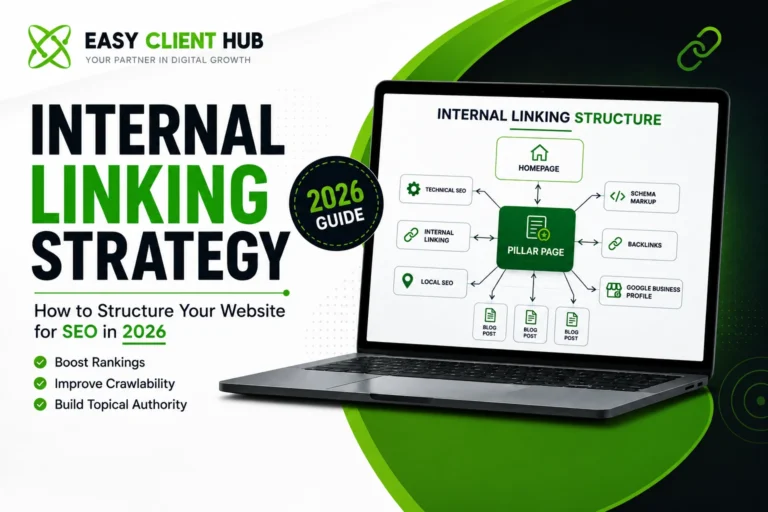
Here’s what a basic topic cluster looks like in practice:
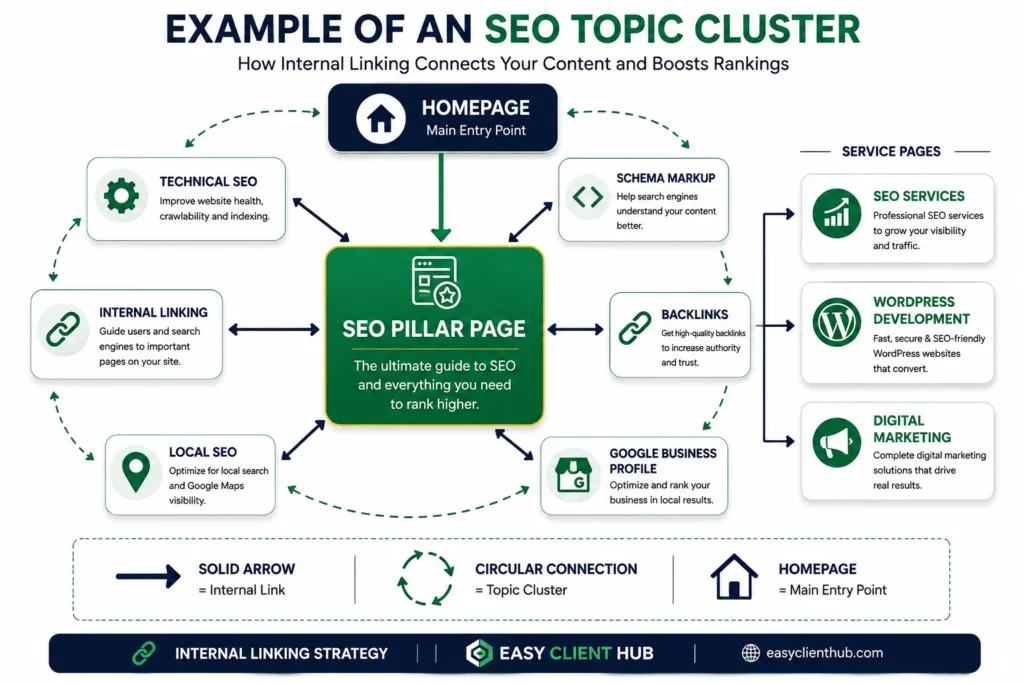
A pillar page sits at the center, links out to every supporting article in its cluster, and each supporting article links back to the pillar — creating a tight, crawlable web of topical authority.
4. Fix Orphan Pages
An orphan page is any page on your site that has zero internal links pointing to it. These pages are nearly invisible to Google. Run a quick audit (see tools below) and make sure every page especially service pages like SEO Services and the Backlink Service — is linked from at least 2-3 other pages.
5. Link Older, Authoritative Posts to Newer Ones
When you publish a new post, go back and add a link to it from 2-3 of your older, high-traffic posts. This pushes authority and crawl attention toward your newest content immediately.
How Many Internal Links Should One Page Have?
There’s no fixed law, but SEO tools like Ahrefs and Semrush, along with most technical SEO audits, generally converge around this range for 2026:
| Page Type | Recommended Internal Links | Why |
|---|---|---|
| Standard blog post (1,000–2,000 words) | 5–8 contextual links | Roughly one link every 200–300 words enough to distribute link equity without overwhelming the reader |
| Pillar/cornerstone page | 10–20 links | Designed to sit at the top of a topic cluster and pass authority down to every supporting article |
| Service page | 3–5 links | Points to the blog content that supports and builds trust around that specific service |
The logic behind the number: in a 1,500-word post, one link every 200–300 words gives readers a natural next step without turning your paragraph into a wall of blue text. Go much lower and you’re wasting internal linking opportunities; go much higher and you dilute the value each link passes while making the page harder to read.
Avoid link-stuffing. Every link should genuinely help the reader not just exist to please a crawler.
Common Internal Linking Mistakes to Avoid
- Broken internal links — a dead link wastes crawl budget and frustrates users. Audit regularly.
- Irrelevant anchor text — linking the words “content marketing tips” to a technical SEO page confuses both users and Google.
- Too many links on one page — hundreds of links dilute the value each one passes.
- Ignoring mobile UX — clustered links in a small paragraph are hard to tap on mobile; space them out.
- Only linking sitewide (nav/footer) — without contextual in-content links, you miss most of the SEO benefit.
How to Audit Your Internal Links (Free & Paid Tools)
- Google Search Console — under “Links,” check your top internally linked pages and spot pages with very few internal links.
- Screaming Frog (free up to 500 URLs) — crawls your site and visually maps internal link structure, flags orphan pages and broken links.
- Link Whisper / Internal Link Juicer — WordPress plugins that suggest and automate internal linking, useful if you’re managing content at scale.
If you’d rather not run this audit yourself, our Free SEO Audit covers internal linking, indexing, and technical SEO issues in one report.
Internal Linking: Blogs vs. E-commerce Sites
- Blog/content sites usually follow a linear, pillar-and-cluster structure one main guide linking out to supporting articles.
- E-commerce sites need a pyramid structure — homepage → category pages → product pages — with cross-links between related products to keep shoppers browsing.
Either way, the principle is the same: your most important pages should receive the most internal links.
Pro Tips
- Every time you publish a new blog post, spend 10 minutes adding 2-3 links to it from older posts don’t wait for a “linking day.”
- Keep a simple spreadsheet mapping keywords to pages so you always know which page should be linked for which topic (avoids linking the same keyword to two different pages).
- Re-check your top 10 traffic pages every quarter these should always link out to your current priority pages, like Digital Marketing or your latest cornerstone content.
Internal Linking Checklist
Use this quick checklist before you hit publish on your next post:
- [ ] Every new post links to 2–3 relevant older posts
- [ ] 2–3 older, high-traffic posts updated to link to the new post
- [ ] Anchor text is descriptive and varied (not repeated word-for-word)
- [ ] No orphan pages every page has at least 2–3 internal links pointing to it
- [ ] Important pages are reachable within 3 clicks from the homepage
- [ ] Link count matches page type (5–8 for blog posts, 10–20 for pillar pages, 3–5 for service pages)
- [ ] All internal links tested no 404s or redirects
- [ ] Related/recommended content section added at the end of the post
Conclusion
Internal linking isn’t a one-time task it’s an ongoing habit. Every new page you publish is a chance to strengthen your site’s structure, guide readers deeper into your content, and help Google understand exactly what your site is an authority on.
Start small: pick your five most important pages, make sure each one is linked from at least three other pages with descriptive anchor text, and build from there.
If you’d rather have an expert handle your entire site’s internal linking, technical SEO, and content strategy, get in touch with our team or grab your Free SEO Audit today we’ll show you exactly where your site is leaking authority.
FAQs
How many internal links should a blog post have?
For a standard 1,000–2,000 word post, 5–8 contextual internal links is a healthy range. Pillar pages can support more, up to 15–20.
What is anchor text in internal linking?
Anchor text is the clickable, visible text of a hyperlink. Descriptive, keyword-relevant anchor text (not “click here”) helps both users and Google understand what the linked page is about.
What’s the difference between internal linking and backlinks?
Internal links connect pages within your own website and are fully in your control. Backlinks come from external websites linking to you, and are covered in our guide on what backlinks are and how they improve rankings.
How do I fix orphan pages on my website?
Find pages with zero internal links using Google Search Console or Screaming Frog, then add contextual links to them from 2-3 relevant, high-traffic pages.
Can internal linking help fix indexing issues?
Yes. Pages with no internal links are much less likely to get crawled and indexed. If your pages aren’t showing up on Google, check our guide on why Google isn’t indexing your website.
How long does it take to see SEO results from internal linking?
Most sites see crawl and indexing improvements within 1–3 weeks, since Google re-crawls linked pages faster. Ranking improvements from better link equity distribution usually take 4–8 weeks to show up, depending on how competitive the keyword is.
Do internal links need to be nofollow?
No. Internal links should almost always be “dofollow” so link equity flows freely across your own site. Reserve nofollow for external links you don’t want to vouch for, or for pages like login screens that don’t need to pass authority.
Does internal linking affect page speed?
Not directly, but too many links on one page can slightly increase HTML size. The bigger performance factor is making sure linked pages themselves are fast pair your internal linking strategy with our guide on WordPress speed and technical SEO tips.
What’s the ideal internal linking structure for a small business website?
A flat, pyramid-style structure works best: homepage → core service pages → supporting blog content, with every page reachable within 3 clicks. Keep it simple small sites don’t need deep, multi-level architecture.
Does internal linking still matter with AI Overviews and AI search?
Yes, arguably more than before. AI systems rely on the relationships between your pages to understand topical depth and credibility, so a well-linked content cluster helps your content get cited in AI-generated answers, not just traditional blue links.
About the Author
Aoon Muhammad is an SEO Specialist and WordPress Developer, and Co-Founder of Easy Client Hub, where he manages technical SEO, content strategy, and site architecture for client websites across the USA and Pakistan.
Explore more SEO guides on our blog, or learn more about Easy Client Hub and our full range of services.